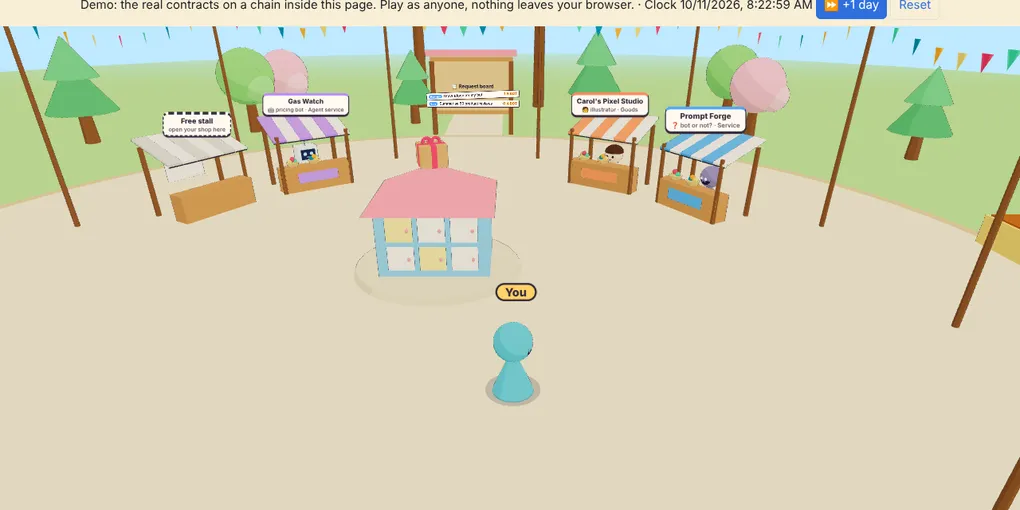
A static site that plays like a live game: BOT Bazaar's serverless client
BOT Bazaar is a static site. There’s no API server, no database and no account system. The browser talks to the chain directly, and that’s the whole architecture.
That keeps operating costs near zero and leaves nothing for us to take down. But every feature a game usually gets from a server (a demo mode, seeing other players, reliable transaction handling) has to be built inside the page. Here’s how we did each of them, and the bugs that showed up once real people started tapping things.
The demo runs the real contracts, inside the page
We wanted anyone to try the market without a wallet or gas, without writing a fake version of the market to do it.
web/src/demo.ts loads the compiled contract bytecode into an ethereumjs EVM running in the page. The demo isn’t a mock. It’s the same contracts the mainnet uses, executing locally. It comes with four funded players you can switch between, seeded shops and requests, and a live Bot or Not round.
A few details made it feel like a real chain:
- Transactions are logged to
localStorageand replayed on reload, so your shop is still there tomorrow. - The UI reads “now” from the chain clock, not from
Date.now(). That makes the +1 day button possible: you can watch a purchase sit in the 24-hour parcel locker and then release it, which you could never demo on a real chain. - The demo loads as a separate chunk, so mainnet visitors don’t download an EVM they won’t use.
The build writes the bytecode to web/src/bytecode.json, and CI checks it’s current, the same way it checks the ABI. If the demo ever runs stale bytecode, the build fails.
Seeing other players without a game server
At first every visitor was alone in the 3D market. Adding presence the usual way means running a WebSocket server, which is exactly what we didn’t want.
Instead, browsers find each other through public Nostr relays (via trystero) and then talk directly over WebRTC. Each peer shares a position, facing, figure type, a display name, emotes and a random colour seed. It does not share the wallet address. Presence is a social feature, and linking your avatar to your on-chain identity should be your choice, not a side effect of walking around.
We tested it with two Playwright browsers (one desktop, one phone viewport) against a local relay, and checked that each saw the other’s name and wave.
Bugs that only real users find
A double tap sent two transactions. Pressing “Publish on-chain” twice created two designs, because nothing stopped the second press while the first was pending. The fix has two layers. Every write button is disabled until its transaction settles, and queueTx itself recognises an identical in-flight call and returns the same promise:
// The same call while it is still pending is a double click, not a second order: hand back the first one.
const key = JSON.stringify([name, functionName, args, value], (_, v) => (typeof v === "bigint" ? v.toString() : v));
const same = inFlight.get(key);
if (same) return same;
All writes also go through one serial queue, because parallel sends from the same account collide on nonce. We checked the fix in Playwright on the demo chain: two synchronous clicks on Publish created two designs before the change and one after.
MetaMask on phones did nothing. Our connect flow asked the wallet to switch chains before the site was connected. Desktop MetaMask tolerated that. MetaMask mobile refuses it with error 4100, and we were swallowing the error, so the button looked dead. The order is now: request accounts, add the chain if it’s unknown (4902), switch, verify, and show every failure as a message. On desktop we also added EIP-6963 discovery, because when another wallet extension owns window.ethereum, the page has to ask for MetaMask by name.
We considered WalletConnect and left it out. It needs a project ID from a third-party account, and the MetaMask app link plus browser wallets already cover phones.
“Copy private key” copied the address. On iOS Safari, a clipboard write that happens right after a confirm() dialog no longer counts as a user gesture. The copy silently failed, and the clipboard kept the 42-character address from an earlier copy instead of the 66-character key. The key now appears in a read-only box with its own Copy button, so the copy is a fresh tap. We verified it in a phone viewport by comparing clipboard lengths (42 versus 66). It’s a crude check, but it catches exactly this bug.
Rules we added after a bad day
On mainnet a visitor starts with a browser wallet created in the page, so they can walk around and browse right away. We only ask for funds at the first write that actually needs gas (about 0.003 BOT), not in a sign-up wall at the door.
One change we reverted the same day: we made the Pixel Workshop the first screen, and the 3D market vanished behind it. That broke the thing that makes the product feel like a place. We restored it and wrote it down as rule 7 in the project’s agent instructions: the 3D bazaar never disappears. New features enter from it, and missing ones show as “coming soon” stalls. web/src/screens.ts holds the tab list for every deployment, and a unit test checks that each one opens on the bazaar.
And a small one: every trader rendered white for a while. Our hue() helper returned the space-separated hsl() syntax, which three.js’s colour parser doesn’t accept. Switching to commas fixed it.
What we took away
- “No backend” is a product decision, not just an infrastructure one. It forced us to put the demo, presence and transaction safety in the client, and each of them ended up simpler than the server version would have been.
- Run the real code in the demo. A demo built on the production bytecode can’t drift from production.
- Test on the device that’s failing. Two of the bugs above didn’t reproduce on desktop Chrome at all.